
Building Autonomous AI Workflows with GPT-5.6 Sol, Terra, and Luna
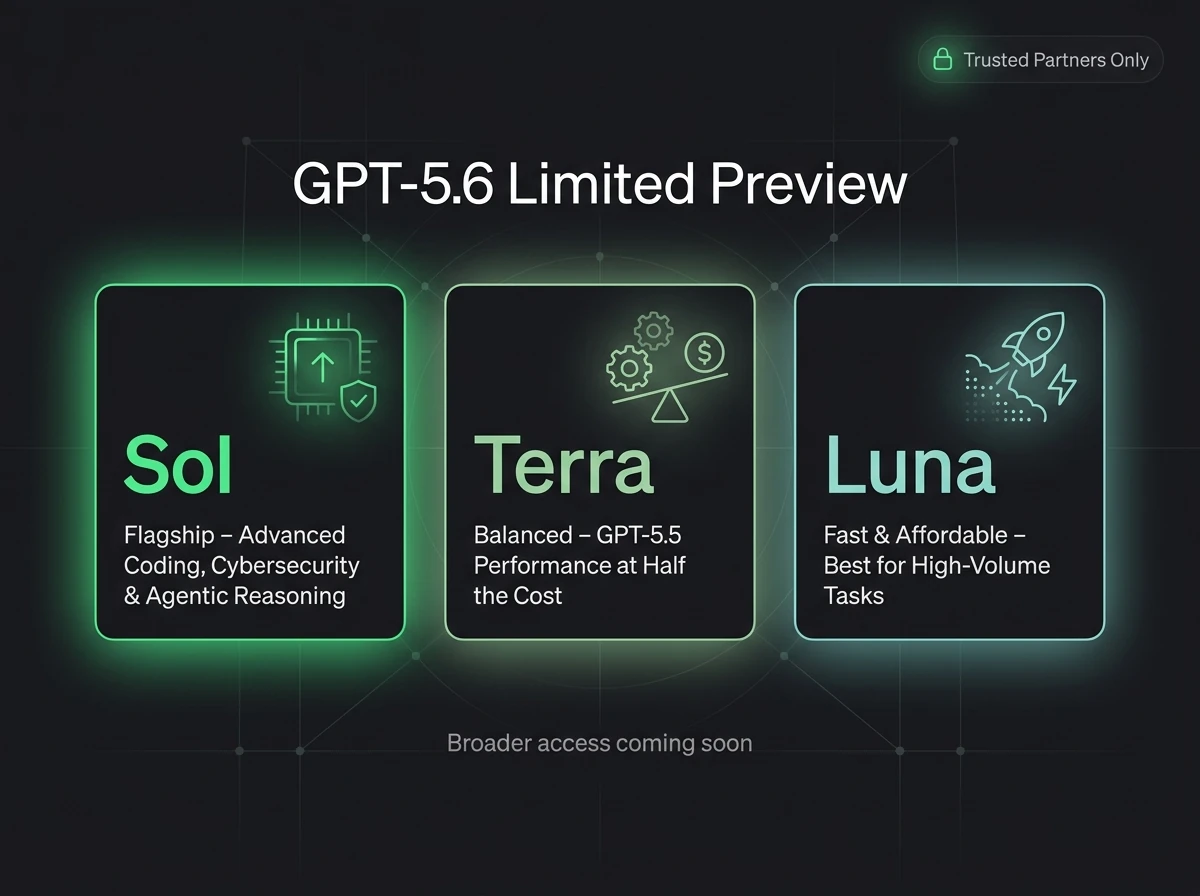
OpenAI's GPT-5.6 preview introduces Sol, Terra, and Luna. Learn how to prepare your n8n and Supabase architectures today. Our guide covers intent-based model routing, pgvector long-term memory setups, cost control, and rate-limit fallback safeguards for production.
OpenAI’s GPT-5.6 limited preview introduces a powerful three-model family: Sol, Terra, and Luna. For growth-minded founders and automation engineers building production pipelines with n8n and Supabase, this release represents a fundamental shift in how we design agent architectures.
Instead of routing every single inquiry to one expensive, all-purpose model, GPT-5.6 forces us to adopt a modular, multi-model routing structure. By routing high-volume, low-complexity classification tasks to the ultra-fast Luna, typical customer responses to the balanced Terra, and reserving the heavy reasoning Sol for escalations and high-risk validations, we can build automated operations that scale without draining the corporate card.
However, during this limited preview, GPT-5.6 is not yet generally available. Access is restricted to approved organizations through OpenAI's developer program. Rebuilding your entire automation stack around a preview model creates a fragile dependency. The smart operational strategy is to construct a resilient, model-agnostic routing framework today using n8n and Supabase. When your API key is granted access, you can transition your active pipelines with a simple database configuration change.
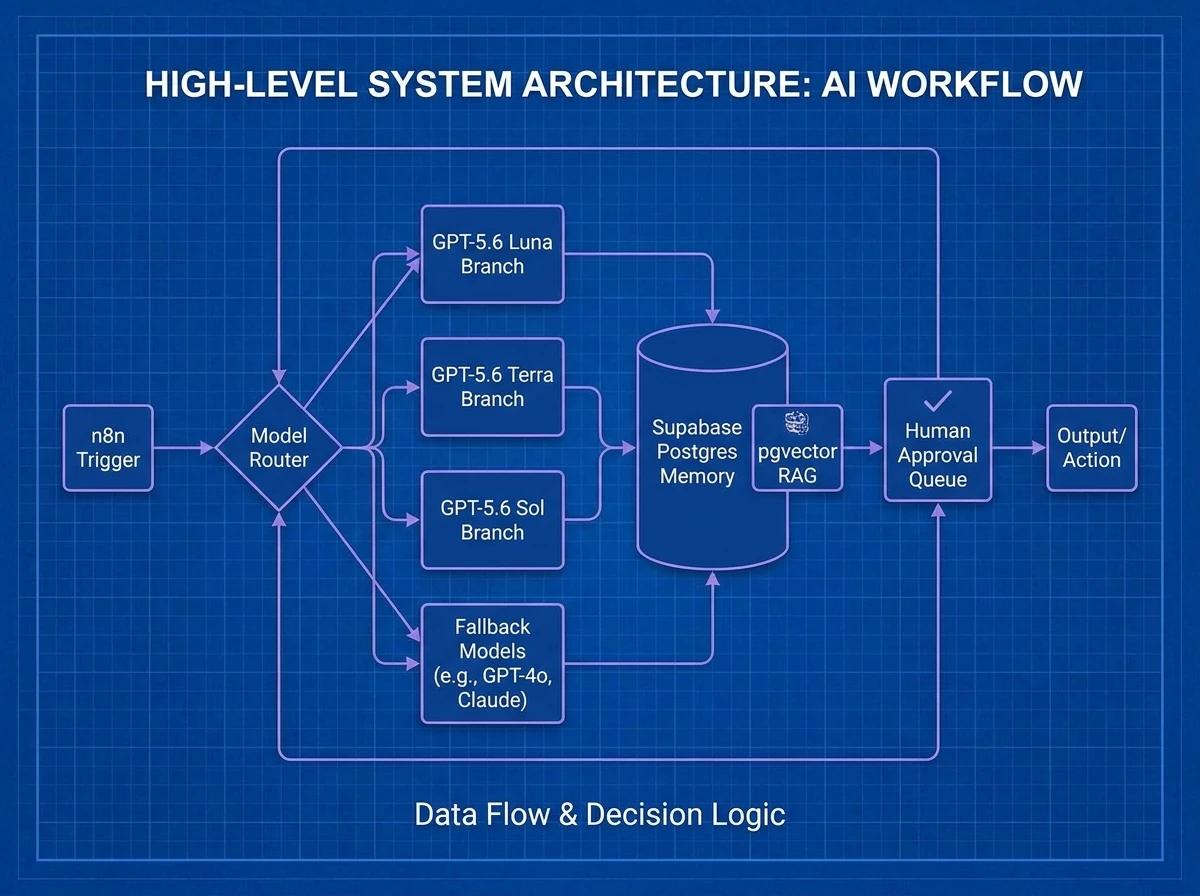 Caption: Resilient multi-model automation pipeline showing n8n webhook ingestion, intent-based routing to Luna, Terra, and Sol, and a pgvector memory backend.
Sol, Terra, and Luna: The Tiered Architecture
In any production-grade automation system, treating all tasks as equal is an operational mistake. Rushing to use the most powerful model for simple administrative tasks like categorizing emails or checking contact details leads to high latency, bloated API bills, and slow response times.
The table below breaks down the roles and performance characteristics of the three GPT-5.6 tiers:
| Model Tier | Primary Purpose | Latency Target | n8n Workflow Role |
|---|---|---|---|
| Luna | Intent classification, input filtering, metadata extraction | Sub-150ms | Ingest guardrail, spam filter, intent classifier, routing decision engine. |
| Terra | Standard agent reasoning, drafting, database sync | 300–600ms | Generating personalized customer replies, formatting Supabase payloads. |
| Sol | Deep logical reasoning, high-risk review, code debugging | 1500ms+ (variable) | Escalation desk, final security validation, processing edge-case exceptions. |
Understanding this operational split allows you to construct highly efficient workflows where each node uses the cheapest and fastest model capable of executing the task.
n8n vs. Zapier for Multi-Model Orchestration
For startups scaling operations, drag-and-drop SaaS platforms like Zapier become technical bottlenecks when building routed AI workflows.
The comparison table below details why a developer-first stack (n8n + Supabase) is the optimal infrastructure for running tiered agent models:
| Operational Metric | Zapier | n8n + Supabase |
|---|---|---|
| Data Routing Control | Clunky branching logic, expensive multi-step tasks. | Natively handle JavaScript routing, Switch nodes, and DB queries. |
| JSON Schema Validation | Requires third-party tools or complex manual parsers. | Full JSON Schema validation via native JS code blocks. |
| Memory Management | Limited variables stored in Zapier tables (no vector database). | Permanent memory schemas in PostgreSQL utilizing pgvector. |
| Cost Scale | Exponentially increases with task volume and execution loops. | Flat server cost (self-hosted) regardless of task volume. |
By coupling n8n’s logic canvas with Supabase's relational Postgres backend, you gain complete data privacy and the granular control required to manage model fallbacks and state.
Deep Dive: The Three Tiers of GPT-5.6
1. Luna: The Front-Line Guardrail
Luna is the high-velocity, low-latency tier of the GPT-5.6 family. In automated lead or customer support pipelines, Luna acts as the initial firewall. Before any database lookup is performed or any heavy reasoning model is invoked, Luna inspects the inbound payload to classify the user's intent, determine inquiry urgency, and identify potential spam or malicious inputs.
Using Luna for front-line triage protects your backend from processing garbage inputs. For example, if an inbound email is classified as spam or out_of_scope, n8n can terminate the execution immediately, saving database query and LLM token costs.
The Luna Formatting Node
Place this JavaScript snippet in your n8n Code node immediately following your webhook trigger to parse and normalize the input format that Luna will evaluate:
// Clean inbound payload and prepare inputs for Luna intent classification
const items = input.all();

return items.map(item => {
  const body = item.json.body || {};
  const cleanEmail = (body.email || '').toLowerCase().trim();
  const rawText = body.message || body.text || '';

  // Strip HTML and double spaces to minimize input token size
  const sanitizedText = rawText
    .replace(/<[^>]*>/g, '')
    .replace(/\s+/g, ' ')
    .trim();

  return {
    json: {
      lead_email: cleanEmail,
      cleaned_text: sanitizedText,
      timestamp: new Date().toISOString()
    }
  };
});
2. Terra: The Balanced Operator
Once Luna classifies an inquiry as a valid, high-value request, the workflow passes execution to Terra. This model represents the workhorse tier of the GPT-5.6 family. Terra possesses the contextual window and intelligence needed to perform semantic searches, process technical documentation, and write natural, helpful responses.
In a customer operations setup, Terra takes the context retrieved from your internal databases and drafts the actual response. Because Terra's cost per thousand tokens is significantly lower than Sol's, it serves as the default model for 85% of your active automated workflows. Learn more about designing automated support streams on our AI Support Chatbots Service page.
graph TD
    A[Luna Inbound Webhook] --> B{Cleaned Input}
    B -->|Intent: Support| C[Query Supabase RAG]
    C --> D[Retrieve Context & Embeddings]
    D --> E[Terra Drafts Customer Reply]
    E --> F{Confidence Score >= 8/10?}
    F -->|Yes| G[Save Draft to Gmail / WhatsApp Send]
    F -->|No| H[Escalate to Sol Reasoning Node]
3. Sol: The Escalation Desk
Sol is the premium reasoning model. When Terra encounters a low-confidence decision, an ambiguous policy, or a complex technical problem, n8n routes the context to Sol. Sol leverages adaptive internal reasoning tokens to evaluate multiple constraints, audit output safety, and debug operational conflicts.
For example, if a client submits an issue regarding custom database syncing or API latency, Terra may lack the depth to solve it without hallucinating. Sol is invoked with the full transaction logs, matches the bug against system logs, writes the resolving database migration, and passes it to your engineering Slack channel for one-click approval.
Designing the n8n Multi-Model Router
To run a multi-model stack efficiently, you must build a centralized router. Hardcoding model names into individual n8n OpenAI nodes creates a maintenance nightmare when API names change or preview access fluctuates.
A structured routing workflow utilizes a centralized Code Node that evaluates incoming metadata (e.g. lead priority, message intent, input character length) and outputs a dynamic target_model and fallback_model variable which subsequent HTTP nodes call.
The n8n Model Router Script
Integrate this code block into your n8n routing logic to dynamically select the model tier based on operational rules:
// Centralized n8n Model Router Node
const items = input.all();

return items.map(item => {
  const metadata = item.json;
  const wordCount = (metadata.cleaned_text || '').split(/\s+/).length;

  let targetModel = 'gpt-4o-mini'; // Default safe fallback
  let fallbackModel = 'gpt-4o';
  let modelTier = 'low-cost';

  // Rule 1: High-urgency billing/technical issues route directly to Sol
  if (metadata.intent === 'billing' || metadata.intent === 'technical_issue') {
    targetModel = 'gpt-5.6-sol';
    fallbackModel = 'gpt-4o';
    modelTier = 'reasoning';
  }
  // Rule 2: Normal inquiries with large context route to Terra
  else if (metadata.intent === 'support' && wordCount > 100) {
    targetModel = 'gpt-5.6-terra';
    fallbackModel = 'gpt-4o-mini';
    modelTier = 'balanced';
  }
  // Rule 3: Short queries, spam checks, and simple intent route to Luna
  else {
    targetModel = 'gpt-5.6-luna';
    fallbackModel = 'gpt-4o-mini';
    modelTier = 'low-cost';
  }

  return {
    json: {
      ...metadata,
      selected_model: targetModel,
      fallback_model: fallbackModel,
      model_tier: modelTier,
      routing_timestamp: new Date().toISOString()
    }
  };
});
Supabase as the Permanent State & Memory Layer
Running autonomous workflows without a central database is dangerous. Models should never be treated as permanent data stores; they are processing units. To build reliable systems, you need a durable relational database to manage conversation history, cache RAG embeddings, and track API logs.
By pairing n8n with Supabase, you get the full power of PostgreSQL, native pgvector support for semantic search, and Row-Level Security (RLS) to safeguard customer records. For a complete guide on database architecture, read: What is an AI Support Chatbot (RAG)?.
 Caption: Storing vector chunks and message logs inside a relational Supabase database enables persistent agent recall.
Production Database Schema
Execute the following SQL script inside your Supabase SQL editor to create a fully optimized, production-ready schema for logging AI executions, tracking model usage costs, and storing semantic memories:
-- Enable the vector extension in Supabase
create extension if not exists vector with schema extensions;

-- Table to log agent executions, latency, and costs
create table public.ai_execution_logs (
    id uuid primary key default gen_random_uuid(),
    workflow_name text not null,
    execution_id text not null,
    route_key text not null,
    model_used text not null,
    input_tokens integer not null default 0,
    output_tokens integer not null default 0,
    estimated_cost numeric(10, 6) not null default 0.000000,
    latency_ms integer not null,
    status text not null,
    fallback_used boolean not null default false,
    error_message text,
    created_at timestamptz default now()
);

-- Table to store permanent customer profiles
create table public.ai_user_profiles (
    id uuid primary key default gen_random_uuid(),
    phone_number text unique,
    email text unique,
    full_name text,
    company_name text,
    lead_status text default 'new',
    created_at timestamptz default now()
);

-- Table to store conversation sessions
create table public.ai_conversations (
    id uuid primary key default gen_random_uuid(),
    user_id uuid references public.ai_user_profiles(id) on delete cascade,
    channel text not null, -- 'whatsapp', 'email', etc.
    status text default 'active',
    summary text,
    updated_at timestamptz default now()
);

-- Table to cache message chunks and vector embeddings for RAG search
create table public.knowledge_base_chunks (
    id uuid primary key default gen_random_uuid(),
    document_title text not null,
    chunk_content text not null,
    embedding vector(1536), -- Dimension matching text-embedding-3-small
    metadata jsonb default '{}'::jsonb,
    created_at timestamptz default now()
);

-- Indexing vectors using HNSW for high-speed similarity search
create index knowledge_base_chunks_embedding_idx
on public.knowledge_base_chunks
using hnsw (embedding vector_cosine_ops);
Similarity Search RPC Function
To perform semantic search across your document chunks inside n8n, create the following PostgreSQL function in Supabase. It uses Cosine Distance to locate the most relevant knowledge matches:
create or replace function match_knowledge_chunks (
  query_embedding vector(1536),
  match_count int default 5,
  similarity_threshold float default 0.7
)
returns table (
  id uuid,
  document_title text,
  chunk_content text,
  similarity float
)
language sql stable
as $$
  select
    id,
    document_title,
    chunk_content,
    1 - (embedding <=> query_embedding) as similarity
  from public.knowledge_base_chunks
  where 1 - (embedding <=> query_embedding) > similarity_threshold
  order by embedding <=> query_embedding
  limit match_count;
$$;
Inside your n8n workflow, you simply call this RPC using a Supabase node or HTTP Request, passing your query vector, and feed the returned text chunks directly to your Terra draft node. See how we build custom dashboards to track these database executions: Dashboards and Internal Tools Service.
Production Safeguards & Error Handling
When developing with preview APIs, build for instability. If the OpenAI endpoint rate-limits your key or experiences minor downtime, your business integrations must continue running without losing data.
1. Exponential Backoff & Retry
Inside your n8n node configuration, click the settings icon and enable Retry on Failure. Set the Max Retries to 3 and the Delay Between Retries to 5000 milliseconds. Enable Exponential Backoff to ensure that your system pauses gracefully if the OpenAI servers are congested.
2. The Try-Catch Fallback Wrapper
Never direct-connect external APIs without a fallback. In n8n, you can route the output of a failing primary node directly to a secondary model block (e.g. falling back from gpt-5.6-terra to gpt-4o). This ensures that your customer support chatbot remains online and responsive even if your preview API access is temporarily revoked.
<aside class="surface-card rounded-2xl p-5 border border-[color:var(--line)] bg-[color:var(--bg-soft)] my-8 font-sans flex flex-col sm:flex-row items-center justify-between gap-4">
  <div>
    <h4 class="font-bold text-[color:var(--ink)] text-xs uppercase tracking-wider">Want this custom automated?</h4>
    <p class="text-[11px] text-[color:var(--muted-soft)] mt-1 leading-normal">Haider Ali can build, deploy, and host this exact pipeline for your team.</p>
  </div>
  <button class="trigger-audit-modal shrink-0 inline-flex h-9 px-4 items-center justify-center rounded-xl bg-slate-900 hover:bg-slate-800 text-white text-[11px] font-bold transition cursor-pointer">
    Claim Free Automation Audit
  </button>
</aside>
Production Deployments: Self-Hosting n8n
While n8n offers a managed cloud service, self-hosting is highly recommended for startups and agencies due to raw cost savings and database proximity. You can host n8n on a simple virtual private server (VPS) from DigitalOcean, Hetzner, or Contabo for under $10/month.
To spin up a production-ready, self-hosted instance of n8n using PostgreSQL as the backend database, use the following docker-compose.yml template:
version: '3.8'

services:
  postgres:
    image: postgres:16-alpine
    container_name: n8n_db
    restart: always
    environment:
      POSTGRES_DB: n8n
      POSTGRES_USER: n8n_user
      POSTGRES_PASSWORD: your_db_secure_password_here
    volumes:
      - pg_data:/var/lib/postgresql/data
    healthcheck:
      test: ["CMD-SHELL", "pg_isready -U n8n_user -d n8n"]
      interval: 10s
      timeout: 5s
      retries: 5

  n8n:
    image: docker.n8n.io/n8nio/n8n:latest
    container_name: n8n_app
    restart: always
    ports:
      - "127.0.0.1:5678:5678"
    environment:
      - DB_TYPE=postgresdb
      - DB_POSTGRESDB_HOST=postgres
      - DB_POSTGRESDB_PORT=5432
      - DB_POSTGRESDB_DATABASE=n8n
      - DB_POSTGRESDB_USER=n8n_user
      - DB_POSTGRESDB_PASSWORD=your_db_secure_password_here
      - N8N_HOST=automation.yourdomain.com
      - N8N_PORT=5678
      - N8N_PROTOCOL=https
      - NODE_ENV=production
      - WEBHOOK_URL=https://automation.yourdomain.com/
      - EXECUTIONS_PROCESS=main
    depends_on:
      postgres:
        condition: service_healthy
    volumes:
      - n8n_data:/home/node/.n8n

volumes:
  pg_data:
  n8n_data:
Memory Optimization for High Load
If you are running high-volume webhook pipelines, a standard n8n container can consume substantial memory because it defaults to spawning a separate Node.js subprocess for every execution (EXECUTIONS_PROCESS=own).
To prevent memory spikes on a small VPS, set EXECUTIONS_PROCESS=main in your environment variables. This forces n8n to execute all workflows inside the main application thread, reducing memory overhead per execution to virtually zero. Also configure pruning by setting EXECUTIONS_DATA_PRUNE=true and EXECUTIONS_DATA_MAX_AGE=168 (pruning logs older than 7 days) to prevent database bloat.
Actionable Strategy: Prepare for GPT-5.6 Today
The ultimate value of GPT-5.6 Sol, Terra, and Luna lies in the architectural discipline they enforce. To set up your business for success, execute the following roadmap:
- Deconstruct Workflows: Identify and isolate model calls. Separate classification, RAG retrieval, response drafting, and safety validations into dedicated nodes.
- Centralize Mappings: Stop hardcoding model names inside n8n canvas nodes. Store your routes and connection mappings inside a Supabase configuration table.
- Run Cost & Latency Audits: Connect execution logging to database tables. Establish your baseline costs today so you can evaluate the ROI of Sol, Terra, and Luna when they launch.
- Enforce Safe Human Gates: Never automate customer-facing operations (e.g. processing billing changes or issuing refunds) without adding a human-in-the-loop validation node in n8n.
Building these systems takes technical precision, but the output is an incredibly robust, future-proof digital operations setup. If you want to skip the learning curve, download our complete n8n Lead Router Workflow Template or explore our Workflow Automation Service page.
Frequently Asked Questions
How do I handle n8n model dropdowns when GPT-5.6 models (Sol, Terra, Luna) are missing?
During the limited preview, n8n may not display these models in its standard dropdown menus. To bypass this, configure n8n's OpenAI Node to use 'Manual Model Name' or 'Resource Type: HTTP Request' and type the exact string identifier (e.g., gpt-5.6-luna-preview). This allows you to route API calls directly through the OpenAI client without waiting for n8n UI updates.
Can I run GPT-5.6 reasoning models (Sol) inside loops without draining my API credits?
Running Sol inside unsupervised loops is highly dangerous. Because Sol utilizes adaptive internal reasoning (reasoning tokens), a single loop iteration can consume thousands of tokens. Always implement execution guardrails: set a hard limit (e.g., max_iterations = 3), track cumulative cost in a state table, and switch to a lower-cost fallback model like Luna or Terra if the threshold is exceeded.
Why should I use Supabase pgvector instead of OpenAI's built-in vector store?
OpenAI’s Assistants API vector store is a closed silo that charges processing and storage fees. By hosting your vector embeddings in Supabase using pgvector, you retain complete ownership of your data, pay zero markup, and can easily run hybrid SQL queries that combine metadata (like user subscription status) and semantic similarity in a single query.
What is the best way to implement a fallback model when the GPT-5.6 preview API returns rate-limit errors?
Set up n8n's Node Settings to automatically retry on failure (e.g., 3 retries, 5000ms delay). Additionally, wrap the model call node inside a Try-Catch flow (or use an n8n Switch node). If the API fails, immediately route the payload to a secondary HTTP node targeting a production-ready model like GPT-4o or Claude 3.5 Sonnet to ensure 100% uptime.
How do I secure my Supabase connection strings inside self-hosted n8n instances?
Never hardcode database credentials in n8n nodes. Store your connection strings, service keys, and private API credentials in your self-hosted server's .env configuration file. Pass them to n8n as system variables, and reference them using n8n credentials or dynamic variables (e.g., {{ $env.DATABASE_URL }}) to keep them out of git repositories and workflow JSON exports.
Summary wrap-up
Automating operational workflows using custom-mapped n8n instances and centralizing logs inside Supabase is the single highest-leverage move for service operations today. It eliminates overhead and ensures zero customer inquiries slip through the cracks.

About the Author: Haider Ali Verified Specialist
Principal Automation Engineer & Founder at Smesh.dev
Haider Ali is an automation engineer specializing in n8n, Supabase, RAG chatbots, AI agents, and high-speed automation systems.
Related Blueprints & Guides
Ready to implement this system?
Skip the manual headaches. Schedule a free 15-minute discovery audit call and let's map out the shortest automation path for your workflows.